|
123456789101112131415161718192021222324252627282930313233343536373839404142434445464748495051525354555657585960616263646566676869707172737475767778798081828384858687888990919293949596979899100101102103104105106107108109110111112113114115116117118119120121122123124125126127128129130131132133134135136137138139140141142143144145146147148149150151152153154155156157158159160161162163164165166167168169170171172173174175176177178179180181182183184185186187188189190191192193194195196197198199200201202203204205206207208209210211212213214215216217218219220221222223224225226227228229230231232233234235236237238239240241242243244245246247248249250251252253254255256257258259260261262263264265266267268269270271272273274275276277278279280281282283284285286287288289290291292293294295296297298299300301302303304305306307308309310311312313314315316317318319320321322323324325326327328329330331332333334335336337338339340341342343344345346347348349350351352353354355356357358359360361362363364365366367368369370371372373374375376377378379380381382383384385386387388389390391392393394395396397398399400401402403404405406407408409410411412413414415416417418419420421422423424425426427428429430431432433434435436437438439440441442443444445446447448449450451452453454455456457458459460461462463464465466467468469470471472473474475476477478479480481 |
- [![npm][npm]][npm-url]
- [![node][node]][node-url]
- 
- [![deps][deps]][deps-url]
- [![tests][tests]][tests-url]
- [](#backers)
- [](#sponsors)
-
- <div align="center">
- <img width="200" height="200" src="https://worldvectorlogo.com/logos/html5.svg">
- <a href="https://github.com/webpack/webpack">
- <img width="200" height="200"
- src="https://webpack.js.org/assets/icon-square-big.svg">
- </a>
- <div>
- <img width="100" height="100" title="Webpack Plugin" src="http://michael-ciniawsky.github.io/postcss-load-plugins/logo.svg">
- </div>
- <h1>HTML Webpack Plugin</h1>
- <p>Plugin that simplifies creation of HTML files to serve your bundles</p>
- </div>
-
- <h2 align="center">Install</h2>
-
-
- ```bash
- npm i --save-dev html-webpack-plugin
- ```
-
- ```bash
- yarn add --dev html-webpack-plugin
- ```
-
-
-
- This is a [webpack](http://webpack.js.org/) plugin that simplifies creation of HTML files to serve your `webpack` bundles. This is especially useful for `webpack` bundles that include a hash in the filename which changes every compilation. You can either let the plugin generate an HTML file for you, supply
- your own template using `lodash` templates or use your own loader.
-
- ### `Plugins`
-
- The `html-webpack-plugin` provides [hooks](https://github.com/jantimon/html-webpack-plugin#events) to extend it to your needs. There are already some really powerful plugins which can be integrated with zero configuration
-
- * [webpack-subresource-integrity](https://www.npmjs.com/package/webpack-subresource-integrity) for enhanced asset security
- * [appcache-webpack-plugin](https://github.com/lettertwo/appcache-webpack-plugin) for iOS and Android offline usage
- * [favicons-webpack-plugin](https://github.com/jantimon/favicons-webpack-plugin) which generates favicons and icons for iOS, Android and desktop browsers
- * [html-webpack-harddisk-plugin](https://github.com/jantimon/html-webpack-harddisk-plugin) can be used to always write to disk the html file, useful when webpack-dev-server / HMR are being used
- * [html-webpack-inline-source-plugin](https://github.com/DustinJackson/html-webpack-inline-source-plugin) to inline your assets in the resulting HTML file
- * [html-webpack-inline-svg-plugin](https://github.com/thegc/html-webpack-inline-svg-plugin) to inline SVGs in the resulting HTML file.
- * [html-webpack-exclude-assets-plugin](https://github.com/jamesjieye/html-webpack-exclude-assets-plugin) for excluding assets using regular expressions
- * [html-webpack-include-assets-plugin](https://github.com/jharris4/html-webpack-include-assets-plugin) for including lists of js or css file paths (such as those copied by the copy-webpack-plugin).
- * [script-ext-html-webpack-plugin](https://github.com/numical/script-ext-html-webpack-plugin) to add `async`, `defer` or `module` attributes to your `<script>` elements, or even inline them
- * [style-ext-html-webpack-plugin](https://github.com/numical/style-ext-html-webpack-plugin) to convert your `<link>`s to external stylesheets into `<style>` elements containing internal CSS
- * [resource-hints-webpack-plugin](https://github.com/jantimon/resource-hints-webpack-plugin) to add resource hints for faster initial page loads using `<link rel='preload'>` and `<link rel='prefetch'>`
- * [preload-webpack-plugin](https://github.com/GoogleChrome/preload-webpack-plugin) for automatically wiring up asynchronous (and other types) of JavaScript chunks using `<link rel='preload'>` helping with lazy-loading
- * [link-media-html-webpack-plugin](https://github.com/yaycmyk/link-media-html-webpack-plugin) allows for injected stylesheet `<link />` tags to have their media attribute set automatically; useful for providing specific desktop/mobile/print etc. stylesheets that the browser will conditionally download
- * [inline-chunk-manifest-html-webpack-plugin](https://github.com/jouni-kantola/inline-chunk-manifest-html-webpack-plugin) for inlining webpack's chunk manifest. Default extracts manifest and inlines in `<head>`
- * [html-webpack-inline-style-plugin](https://github.com/djaax/html-webpack-inline-style-plugin) for inlining styles to HTML elements using [juice](https://github.com/Automattic/juice). Useful for email generation automatisation.
- * [html-webpack-exclude-empty-assets-plugin](https://github.com/KnisterPeter/html-webpack-exclude-empty-assets-plugin) removes empty assets from being added to the html. This fixes some problems with extract-text-plugin with webpack 4.
- * [webpack-concat-plugin](https://github.com/hxlniada/webpack-concat-plugin) for concat and uglify files that needn't to be webpack bundles(for legacy files) and inject to html-webpack-plugin.
-
-
- <h2 align="center">Usage</h2>
-
- The plugin will generate an HTML5 file for you that includes all your `webpack`
- bundles in the body using `script` tags. Just add the plugin to your `webpack`
- config as follows:
-
- **webpack.config.js**
- ```js
- const HtmlWebpackPlugin = require('html-webpack-plugin')
-
- module.exports = {
- entry: 'index.js',
- output: {
- path: __dirname + '/dist',
- filename: 'index_bundle.js'
- },
- plugins: [
- new HtmlWebpackPlugin()
- ]
- }
- ```
-
- This will generate a file `dist/index.html` containing the following
-
- ```html
- <!DOCTYPE html>
- <html>
- <head>
- <meta charset="utf-8">
- <title>Webpack App</title>
- </head>
- <body>
- <script src="index_bundle.js"></script>
- </body>
- </html>
- ```
-
- If you have multiple `webpack` entry points, they will all be included with `script` tags in the generated HTML.
-
- If you have any CSS assets in webpack's output (for example, CSS extracted with the [ExtractTextPlugin](https://github.com/webpack/extract-text-webpack-plugin))
- then these will be included with `<link>` tags in the HTML head.
-
- If you have plugins that make use of it, `html-webpack-plugin` should be ordered first before any of the integrated plugins.
-
- <h2 align="center">Options</h2>
-
- You can pass a hash of configuration options to `html-webpack-plugin`.
- Allowed values are as follows
-
- |Name|Type|Default|Description|
- |:--:|:--:|:-----:|:----------|
- |**[`title`](#)**|`{String}`|`Webpack App`|The title to use for the generated HTML document|
- |**[`filename`](#)**|`{String}`|`'index.html'`|The file to write the HTML to. Defaults to `index.html`. You can specify a subdirectory here too (eg: `assets/admin.html`)|
- |**[`template`](#)**|`{String}`|``|`webpack` require path to the template. Please see the [docs](https://github.com/jantimon/html-webpack-plugin/blob/master/docs/template-option.md) for details|
- |**[`templateParameters`](#)**|`{Boolean\|Object\|Function}`|``| Allows to overwrite the parameters used in the template |
- |**[`inject`](#)**|`{Boolean\|String}`|`true`|`true \|\| 'head' \|\| 'body' \|\| false` Inject all assets into the given `template` or `templateContent`. When passing `true` or `'body'` all javascript resources will be placed at the bottom of the body element. `'head'` will place the scripts in the head element|
- |**[`favicon`](#)**|`{String}`|``|Adds the given favicon path to the output HTML|
- |**[`meta`](#)**|`{Object}`|`{}`|Allows to inject `meta`-tags. E.g. `meta: {viewport: 'width=device-width, initial-scale=1, shrink-to-fit=no'}`|
- |**[`minify`](#)**|`{Boolean\|Object}`|`false`|Pass [html-minifier](https://github.com/kangax/html-minifier#options-quick-reference)'s options as object to minify the output|
- |**[`hash`](#)**|`{Boolean}`|`false`|If `true` then append a unique `webpack` compilation hash to all included scripts and CSS files. This is useful for cache busting|
- |**[`cache`](#)**|`{Boolean}`|`true`|Emit the file only if it was changed|
- |**[`showErrors`](#)**|`{Boolean}`|`true`|Errors details will be written into the HTML page|
- |**[`chunks`](#)**|`{?}`|`?`|Allows you to add only some chunks (e.g only the unit-test chunk)|
- |**[`chunksSortMode`](#plugins)**|`{String\|Function}`|`auto`|Allows to control how chunks should be sorted before they are included to the HTML. Allowed values are `'none' \| 'auto' \| 'dependency' \| 'manual' \| {Function}`|
- |**[`excludeChunks`](#)**|`{Array.<string>}`|``|Allows you to skip some chunks (e.g don't add the unit-test chunk)|
- |**[`xhtml`](#)**|`{Boolean}`|`false`|If `true` render the `link` tags as self-closing (XHTML compliant)|
-
- Here's an example webpack config illustrating how to use these options
-
- **webpack.config.js**
- ```js
- {
- entry: 'index.js',
- output: {
- path: __dirname + '/dist',
- filename: 'index_bundle.js'
- },
- plugins: [
- new HtmlWebpackPlugin({
- title: 'My App',
- filename: 'assets/admin.html'
- })
- ]
- }
- ```
-
- ### `Generating Multiple HTML Files`
-
- To generate more than one HTML file, declare the plugin more than
- once in your plugins array
-
- **webpack.config.js**
- ```js
- {
- entry: 'index.js',
- output: {
- path: __dirname + '/dist',
- filename: 'index_bundle.js'
- },
- plugins: [
- new HtmlWebpackPlugin(), // Generates default index.html
- new HtmlWebpackPlugin({ // Also generate a test.html
- filename: 'test.html',
- template: 'src/assets/test.html'
- })
- ]
- }
- ```
-
- ### `Writing Your Own Templates`
-
- If the default generated HTML doesn't meet your needs you can supply
- your own template. The easiest way is to use the `template` option and pass a custom HTML file.
- The html-webpack-plugin will automatically inject all necessary CSS, JS, manifest
- and favicon files into the markup.
-
- ```js
- plugins: [
- new HtmlWebpackPlugin({
- title: 'Custom template',
- // Load a custom template (lodash by default see the FAQ for details)
- template: 'index.html'
- })
- ]
- ```
-
- **index.html**
- ```html
- <!DOCTYPE html>
- <html>
- <head>
- <meta charset="utf-8"/>
- <title><%= htmlWebpackPlugin.options.title %></title>
- </head>
- <body>
- </body>
- </html>
- ```
-
- If you already have a template loader, you can use it to parse the template.
- Please note that this will also happen if you specifiy the html-loader and use `.html` file as template.
-
- **webpack.config.js**
- ```js
- module: {
- loaders: [
- { test: /\.hbs$/, loader: "handlebars-loader" }
- ]
- },
- plugins: [
- new HtmlWebpackPlugin({
- title: 'Custom template using Handlebars',
- template: 'index.hbs'
- })
- ]
- ```
-
- You can use the `lodash` syntax out of the box. If the `inject` feature doesn't fit your needs and you want full control over the asset placement use the [default template](https://github.com/jaketrent/html-webpack-template/blob/86f285d5c790a6c15263f5cc50fd666d51f974fd/index.html) of the [html-webpack-template project](https://github.com/jaketrent/html-webpack-template) as a starting point for writing your own.
-
- The following variables are available in the template:
- - `htmlWebpackPlugin`: data specific to this plugin
- - `htmlWebpackPlugin.files`: a massaged representation of the
- `assetsByChunkName` attribute of webpack's [stats](https://github.com/webpack/docs/wiki/node.js-api#stats)
- object. It contains a mapping from entry point name to the bundle filename, eg:
- ```json
- "htmlWebpackPlugin": {
- "files": {
- "css": [ "main.css" ],
- "js": [ "assets/head_bundle.js", "assets/main_bundle.js"],
- "chunks": {
- "head": {
- "entry": "assets/head_bundle.js",
- "css": [ "main.css" ]
- },
- "main": {
- "entry": "assets/main_bundle.js",
- "css": []
- },
- }
- }
- }
- ```
- If you've set a publicPath in your webpack config this will be reflected
- correctly in this assets hash.
-
- - `htmlWebpackPlugin.options`: the options hash that was passed to
- the plugin. In addition to the options actually used by this plugin,
- you can use this hash to pass arbitrary data through to your template.
-
- - `webpack`: the webpack [stats](https://github.com/webpack/docs/wiki/node.js-api#stats)
- object. Note that this is the stats object as it was at the time the HTML template
- was emitted and as such may not have the full set of stats that are available
- after the webpack run is complete.
-
- - `webpackConfig`: the webpack configuration that was used for this compilation. This
- can be used, for example, to get the `publicPath` (`webpackConfig.output.publicPath`).
-
- - `compilation`: the webpack [compilation](https://webpack.js.org/api/compilation/) object.
- This can be used, for example, to get the contents of processed assets and inline them
- directly in the page, through `compilation.assets[...].source()`
- (see [the inline template example](examples/inline/template.pug)).
-
-
- ### `Filtering Chunks`
-
- To include only certain chunks you can limit the chunks being used
-
- **webpack.config.js**
- ```js
- plugins: [
- new HtmlWebpackPlugin({
- chunks: ['app']
- })
- ]
- ```
-
- It is also possible to exclude certain chunks by setting the `excludeChunks` option
-
- **webpack.config.js**
- ```js
- plugins: [
- new HtmlWebpackPlugin({
- excludeChunks: [ 'dev-helper' ]
- })
- ]
- ```
-
- ### `Events`
-
- To allow other [plugins](https://github.com/webpack/docs/wiki/plugins) to alter the HTML this plugin executes
- [tapable](https://github.com/webpack/tapable/tree/master) hooks.
-
- The [lib/hooks.js](https://github.com/jantimon/html-webpack-plugin/blob/master/lib/hooks.js) contains all information
- about which values are passed.
-
- [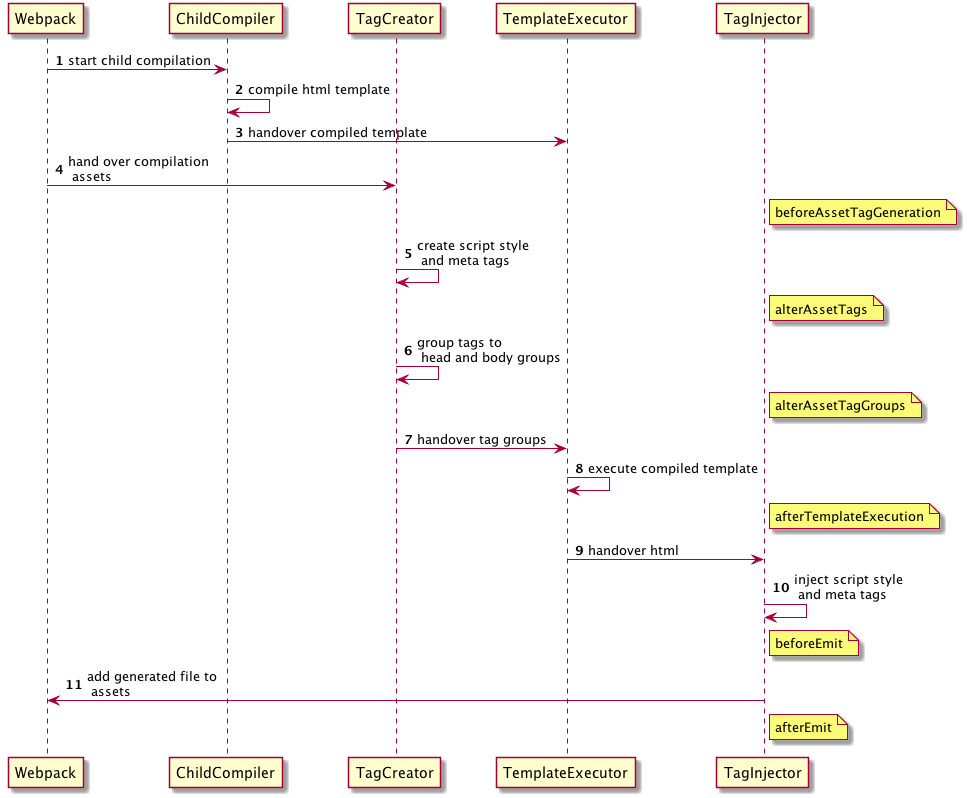](https://github.com/jantimon/html-webpack-plugin/blob/master/flow.puml)
-
- #### `beforeAssetTagGeneration` hook
-
- ```
- AsyncSeriesWaterfallHook<{
- assets: {
- publicPath: string,
- js: Array<{string}>,
- css: Array<{string}>,
- favicon?: string | undefined,
- manifest?: string | undefined
- },
- outputName: string,
- plugin: HtmlWebpackPlugin
- }>
- ```
-
- #### `alterAssetTags` hook
-
- ```
- AsyncSeriesWaterfallHook<{
- assetTags: {
- scripts: Array<HtmlTagObject>,
- styles: Array<HtmlTagObject>,
- meta: Array<HtmlTagObject>,
- },
- outputName: string,
- plugin: HtmlWebpackPlugin
- }>
- ```
-
- #### `alterAssetTagGroups` hook
-
- ```
- AsyncSeriesWaterfallHook<{
- headTags: Array<HtmlTagObject | HtmlTagObject>,
- bodyTags: Array<HtmlTagObject | HtmlTagObject>,
- outputName: string,
- plugin: HtmlWebpackPlugin
- }>
- ```
-
- #### `afterTemplateExecution` hook
-
- ```
- AsyncSeriesWaterfallHook<{
- html: string,
- headTags: Array<HtmlTagObject | HtmlTagObject>,
- bodyTags: Array<HtmlTagObject | HtmlTagObject>,
- outputName: string,
- plugin: HtmlWebpackPlugin,
- }>
- ```
-
- #### `beforeEmit` hook
-
- ```
- AsyncSeriesWaterfallHook<{
- html: string,
- outputName: string,
- plugin: HtmlWebpackPlugin,
- }>
- ```
-
- #### `afterEmit` hook
-
- ```
- AsyncSeriesWaterfallHook<{
- outputName: string,
- plugin: HtmlWebpackPlugin
- }>
- ```
-
- Example implementation: [html-webpack-harddisk-plugin](https://github.com/jantimon/html-webpack-harddisk-plugin)
-
- **plugin.js**
- ```js
- class MyPlugin {
- apply (compiler) {
- compiler.hooks.compilation.tap('MyPlugin', (compilation) => {
- console.log('The compiler is starting a new compilation...')
-
- // Staic Plugin interface |compilation |HOOK NAME | register listener
- HtmlWebpackPlugin.getHooks(compilation).beforeEmit.tapAsync(
- 'MyPlugin', // <-- Set a meaningful name here for stacktraces
- (data, cb) => {
- // Manipulate the content
- data.html += 'The Magic Footer'
- // Tell webpack to move on
- cb(null, data)
- }
- )
- })
- }
- }
-
- module.exports = MyPlugin
- ```
-
- **webpack.config.js**
- ```js
- plugins: [
- new MyPlugin({ options: '' })
- ]
- ```
-
- Note that the callback must be passed the HtmlWebpackPluginData in order to pass this onto any other plugins listening on the same `beforeEmit` event
-
- <h2 align="center">Maintainers</h2>
-
- <table>
- <tbody>
- <tr>
- <td align="center">
- <img width="150" height="150"
- src="https://avatars3.githubusercontent.com/u/4113649?v=3&s=150">
- </br>
- <a href="https://github.com/jantimon">Jan Nicklas</a>
- </td>
- <td align="center">
- <img width="150" height="150"
- src="https://avatars2.githubusercontent.com/u/4112409?v=3&s=150">
- </br>
- <a href="https://github.com/mastilver">Thomas Sileghem</a>
- </td>
- </tr>
- <tbody>
- </table>
-
-
- [npm]: https://img.shields.io/npm/v/html-webpack-plugin.svg
- [npm-url]: https://npmjs.com/package/html-webpack-plugin
-
- [node]: https://img.shields.io/node/v/html-webpack-plugin.svg
- [node-url]: https://nodejs.org
-
- [deps]: https://david-dm.org/jantimon/html-webpack-plugin.svg
- [deps-url]: https://david-dm.org/jantimon/html-webpack-plugin
-
- [tests]: http://img.shields.io/travis/jantimon/html-webpack-plugin.svg
- [tests-url]: https://travis-ci.org/jantimon/html-webpack-plugin
-
-
- ## Contributors
-
- This project exists thanks to all the people who contribute.
-
- You're free to contribute to this project by submitting [issues](https://github.com/jantimon/html-webpack-plugin/issues) and/or [pull requests](https://github.com/jantimon/html-webpack-plugin/pulls). This project is test-driven, so keep in mind that every change and new feature should be covered by tests.
-
- This project uses the [semistandard code style](https://github.com/Flet/semistandard).
-
- <a href="https://github.com/jantimon/html-webpack-plugin/graphs/contributors"><img src="https://opencollective.com/html-webpack-plugin/contributors.svg?width=890&button=false" /></a>
-
-
- ## Backers
-
- Thank you to all our backers! 🙏 [Become a backer](https://opencollective.com/html-webpack-plugin#backer)
-
- <a href="https://opencollective.com/html-webpack-plugin/backer/0/website?requireActive=false" target="_blank"><img src="https://opencollective.com/html-webpack-plugin/backer/0/avatar.svg?requireActive=false"></a>
- <a href="https://opencollective.com/html-webpack-plugin/backer/1/website?requireActive=false" target="_blank"><img src="https://opencollective.com/html-webpack-plugin/backer/1/avatar.svg?requireActive=false"></a>
- <a href="https://opencollective.com/html-webpack-plugin/backer/2/website?requireActive=false" target="_blank"><img src="https://opencollective.com/html-webpack-plugin/backer/2/avatar.svg?requireActive=false"></a>
- <a href="https://opencollective.com/html-webpack-plugin/backer/3/website?requireActive=false" target="_blank"><img src="https://opencollective.com/html-webpack-plugin/backer/3/avatar.svg?requireActive=false"></a>
- <a href="https://opencollective.com/html-webpack-plugin/backer/4/website?requireActive=false" target="_blank"><img src="https://opencollective.com/html-webpack-plugin/backer/4/avatar.svg?requireActive=false"></a>
- <a href="https://opencollective.com/html-webpack-plugin/backer/5/website?requireActive=false" target="_blank"><img src="https://opencollective.com/html-webpack-plugin/backer/5/avatar.svg?requireActive=false"></a>
- <a href="https://opencollective.com/html-webpack-plugin/backer/6/website?requireActive=false" target="_blank"><img src="https://opencollective.com/html-webpack-plugin/backer/6/avatar.svg?requireActive=false"></a>
- <a href="https://opencollective.com/html-webpack-plugin/backer/7/website?requireActive=false" target="_blank"><img src="https://opencollective.com/html-webpack-plugin/backer/7/avatar.svg?requireActive=false"></a>
- <a href="https://opencollective.com/html-webpack-plugin/backer/8/website?requireActive=false" target="_blank"><img src="https://opencollective.com/html-webpack-plugin/backer/8/avatar.svg?requireActive=false"></a>
- <a href="https://opencollective.com/html-webpack-plugin/backer/9/website?requireActive=false" target="_blank"><img src="https://opencollective.com/html-webpack-plugin/backer/9/avatar.svg?requireActive=false"></a>
-
- ## Sponsors
-
- Support this project by becoming a sponsor. Your logo will show up here with a link to your website. [Become a sponsor](https://opencollective.com/html-webpack-plugin#sponsor)
-
- <a href="https://opencollective.com/html-webpack-plugin/sponsor/0/website" target="_blank"><img src="https://opencollective.com/html-webpack-plugin/sponsor/0/avatar.svg"></a>
- <a href="https://opencollective.com/html-webpack-plugin/sponsor/1/website" target="_blank"><img src="https://opencollective.com/html-webpack-plugin/sponsor/1/avatar.svg"></a>
- <a href="https://opencollective.com/html-webpack-plugin/sponsor/2/website" target="_blank"><img src="https://opencollective.com/html-webpack-plugin/sponsor/2/avatar.svg"></a>
- <a href="https://opencollective.com/html-webpack-plugin/sponsor/3/website" target="_blank"><img src="https://opencollective.com/html-webpack-plugin/sponsor/3/avatar.svg"></a>
- <a href="https://opencollective.com/html-webpack-plugin/sponsor/4/website" target="_blank"><img src="https://opencollective.com/html-webpack-plugin/sponsor/4/avatar.svg"></a>
- <a href="https://opencollective.com/html-webpack-plugin/sponsor/5/website" target="_blank"><img src="https://opencollective.com/html-webpack-plugin/sponsor/5/avatar.svg"></a>
- <a href="https://opencollective.com/html-webpack-plugin/sponsor/6/website" target="_blank"><img src="https://opencollective.com/html-webpack-plugin/sponsor/6/avatar.svg"></a>
- <a href="https://opencollective.com/html-webpack-plugin/sponsor/7/website" target="_blank"><img src="https://opencollective.com/html-webpack-plugin/sponsor/7/avatar.svg"></a>
- <a href="https://opencollective.com/html-webpack-plugin/sponsor/8/website" target="_blank"><img src="https://opencollective.com/html-webpack-plugin/sponsor/8/avatar.svg"></a>
- <a href="https://opencollective.com/html-webpack-plugin/sponsor/9/website" target="_blank"><img src="https://opencollective.com/html-webpack-plugin/sponsor/9/avatar.svg"></a>
-
-
|

